> For the complete documentation index, see [llms.txt](https://documentation.peacefulqode.co.in/llms.txt). Markdown versions of documentation pages are available by appending `.md` to page URLs; this page is available as [Markdown](https://documentation.peacefulqode.co.in/constor-documentation/constor-documentation/theme-options/pq-global.md).

# PQ GLobal

You can change Loader settings and Back to top settings from this Tab

For Loader settings select Loader Settings.

<figure><img src="https://3712240295-files.gitbook.io/~/files/v0/b/gitbook-x-prod.appspot.com/o/spaces%2FGemSP7ylYfpacYhipgIQ%2Fuploads%2FV3oeQ7XZdC1ZudDQvdwl%2Fimage.png?alt=media&amp;token=8ab3df24-adba-4265-a116-5be032257a62" alt=""><figcaption></figcaption></figure>

You can change the loader type as well from these settings, also you can change the height & weight of the loader.

You can put the text as a loader.

You can also change the background of the Loader.

<figure><img src="https://3712240295-files.gitbook.io/~/files/v0/b/gitbook-x-prod.appspot.com/o/spaces%2FGemSP7ylYfpacYhipgIQ%2Fuploads%2FOl4MAYRMeJNPxIDxMsd8%2Fimage.png?alt=media&amp;token=2ce40e24-dc12-46cc-b05f-433fe7afc036" alt=""><figcaption></figcaption></figure>

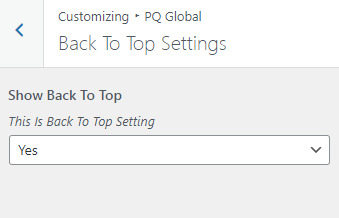
For Back to top select Back to top Settings.

<figure><img src="https://3712240295-files.gitbook.io/~/files/v0/b/gitbook-x-prod.appspot.com/o/spaces%2FGemSP7ylYfpacYhipgIQ%2Fuploads%2F1tCNjP8RO7DIMZZAGmjz%2Fimage.png?alt=media&amp;token=9f26f712-27a5-4acb-9301-0d6a14365e7a" alt=""><figcaption></figcaption></figure>